Convert binary code to readable text and text back to binary instantly. Supports 8-bit ASCII with clean handling of spaces and punctuation.
Translate between binary and plain text in either direction.
How to Use the Binary to Text Converter
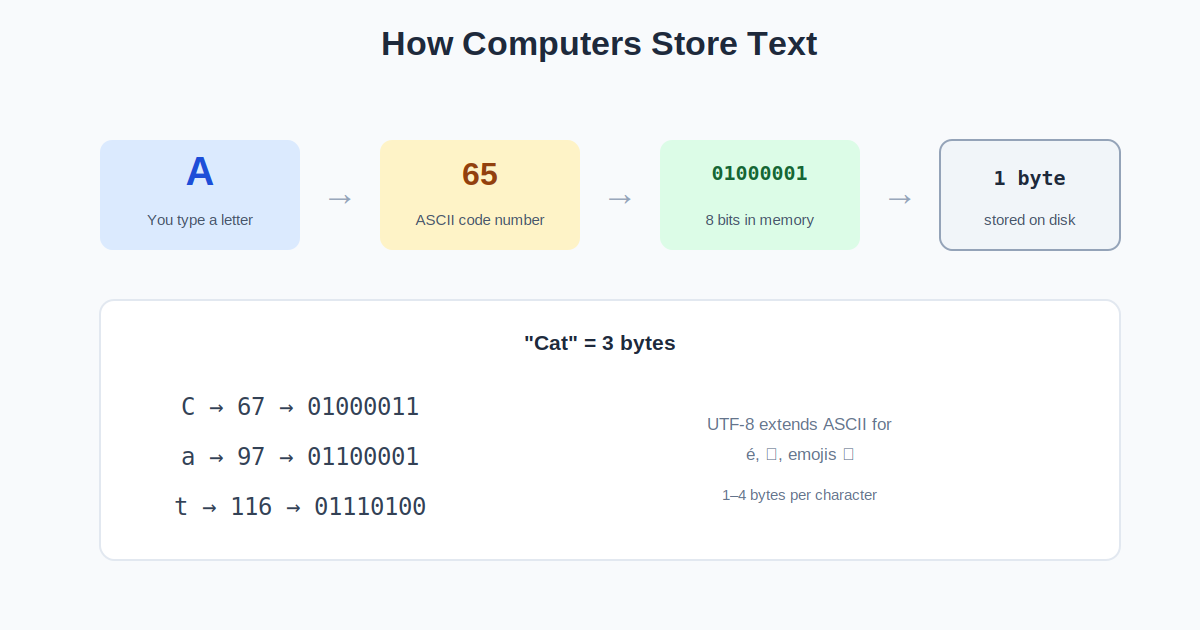
Computers store everything as ones and zeros. This converter translates between human-readable text and its binary representation using standard 8-bit ASCII encoding, where each character becomes a group of eight bits.
- Choose a direction. Binary to text decodes bit groups; text to binary encodes your words.
- Enter your input. For binary, separate each 8-bit group with a space (like 01001000 01101001). For text, just type normally.
- Convert. Results update live as you type.
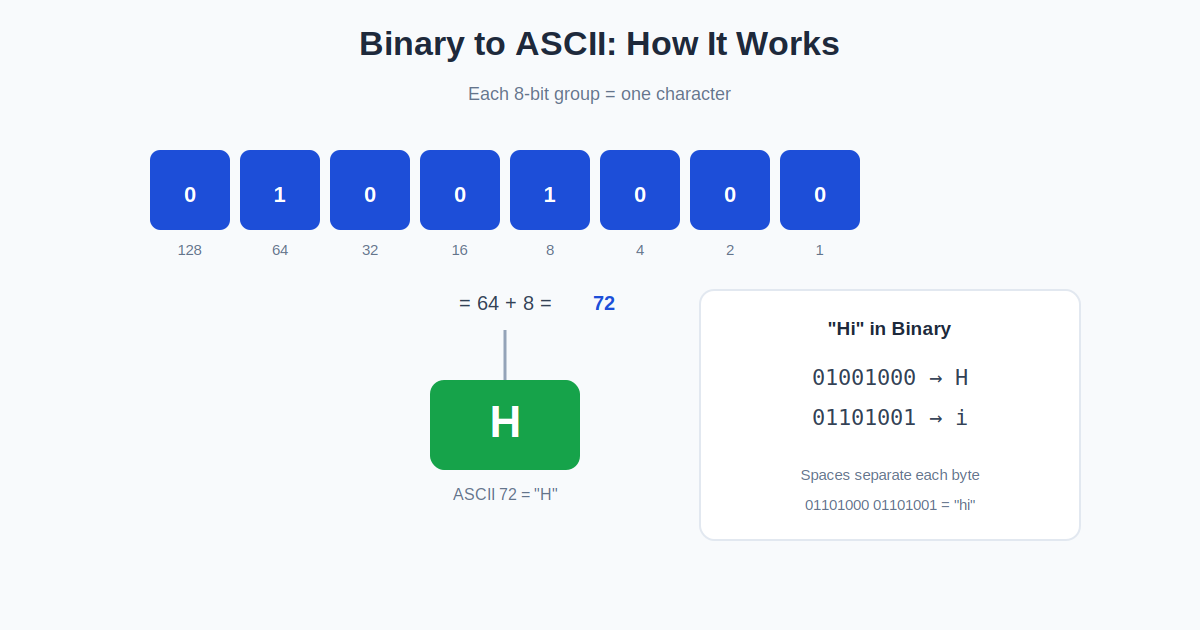
- Try the example. The default input 01001000 01101001 decodes to “Hi” — H is 72 in ASCII (01001000), i is 105 (01101001).
How Binary Text Encoding Works
Each character maps to a number: A is 65, B is 66, a is 97, and so on through the ASCII table. That number is written in base 2 using 8 bits. So “H” (72) becomes 01001000 because 72 = 64 + 8. Spaces, punctuation, and digits all have codes too — a space is 32 (00100000).
Eight bits make a byte, and the space-separated groups matter: without them, the decoder cannot tell where one character ends and the next begins. This is why binary text is always shown in 8-bit chunks. Modern systems extend this idea with UTF-8, which uses variable-length encoding to cover every writing system on earth while staying backward compatible with ASCII.
Worked Example
Encode “Hi”. H = 72. Convert 72 to binary: 64 + 8 = 01001000. i = 105. Convert: 64 + 32 + 8 + 1 = 01101001. Result: “01001000 01101001”. Decode it back: 01001000 is 64+8 = 72 = H; 01101001 is 64+32+8+1 = 105 = i. Together: “Hi”. Try it in the converter above.
Common Words in Binary
Short words are the ones people look up most — for tattoos, T-shirts, puzzle hints, and secret messages. Each letter is one 8-bit byte; the decimal codes are there if you want to check a byte by hand.
| Word | Binary (8-bit bytes) | ASCII codes |
|---|---|---|
| Hi | 01001000 01101001 | 72, 105 |
| Hello | 01001000 01100101 01101100 01101100 01101111 | 72, 101, 108, 108, 111 |
| Yes | 01011001 01100101 01110011 | 89, 101, 115 |
| No | 01001110 01101111 | 78, 111 |
| OK | 01001111 01001011 | 79, 75 |
| Love | 01001100 01101111 01110110 01100101 | 76, 111, 118, 101 |
ASCII vs UTF-8: Why Some Characters Need More Than One Byte
Plain ASCII covers 128 characters — English letters, digits, punctuation, and control codes — and fits every one into a single byte. That is all this converter handles, which is why it is fast and predictable for English text. Modern text uses UTF-8 instead, which keeps the same first 128 codes but adds variable-length sequences for everything else: an accented character like é takes two bytes (11000011 10101001), and an emoji takes four. If you paste multi-byte UTF-8 binary into an ASCII converter, each byte is decoded as its own character and the result looks like garbled pairs of symbols — a sign the text was encoded in UTF-8, not that the binary is wrong. For accented text and emoji, use a full Unicode converter; for English letters, numbers, and punctuation, the 8-bit ASCII conversion above is exact.
Frequently Asked Questions
What is binary code?
Binary is base-2 counting using only 0 and 1. Computers use it because transistors have two stable states (on/off), making binary the natural language of hardware.
Why 8 bits per character?
Eight bits (one byte) can represent 256 values (0-255), enough for English letters, digits, punctuation, and control codes in the ASCII standard.
What is ASCII?
The American Standard Code for Information Interchange assigns numbers 0-127 to characters. A=65, a=97, 0=48, space=32. It is the foundation of all text encoding.
Can I encode emojis in binary?
This tool handles basic ASCII only. Emojis use Unicode/UTF-8 multi-byte sequences, which need a full Unicode converter.
Why do groups need spaces between them?
Without separators, 0100100001101001 is ambiguous — the decoder needs 8-bit boundaries to split it into 01001000 and 01101001 correctly.
How do I write my name in binary?
Take each letter of your name, find its ASCII code, and write that code as an 8-bit binary number. For example, Ana is A = 65 = 01000001, n = 110 = 01101110, a = 97 = 01100001, giving 01000001 01101110 01100001. Type the plain text into the converter above with the direction set to text to binary to check your work.
Is binary the same as ASCII?
No. Binary is a number system — counting in base 2 using only 0 and 1. ASCII is a lookup table that assigns a number to each character, and those numbers are then stored in binary. Binary is how the machine writes numbers; ASCII is one dictionary for translating between numbers and letters.
Related Calculators
Working with number bases? The Scientific Calculator handles conversions and bit math. For more base conversions, try the Binary Converter or the Hex Calculator.