Add, subtract, dot product, cross product, magnitude, and angle for 2D and 3D vectors with clear step-by-step results.
Enter two vectors (use 0 for z to work in 2D) and pick an operation.
Vector A
Vector B
How to Use the Vector Calculator
- Enter the x, y, and z components of vector A. For 2D problems, leave z as 0.
- Enter the components of vector B the same way.
- Choose an operation: addition, subtraction, dot product, cross product, magnitudes, or the angle between the vectors.
- Click Calculate. Results appear with a short explanation of what each answer means.
- Try the angle option on perpendicular vectors like (1, 0, 0) and (0, 1, 0) to confirm you get 90 degrees.
Vector Formulas
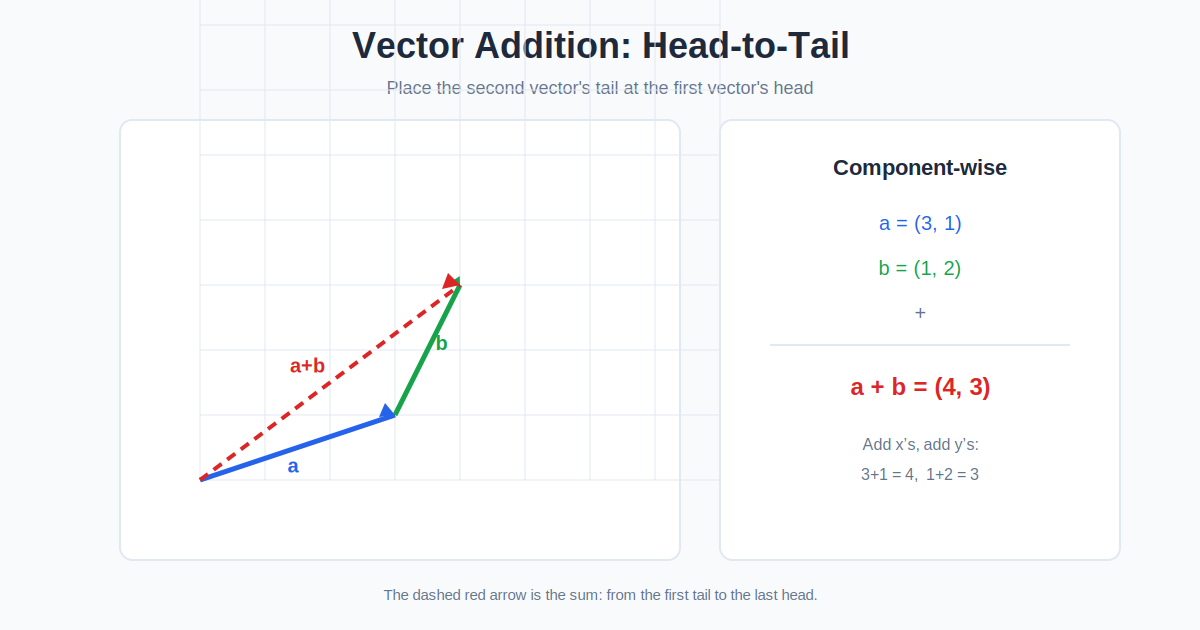
Vectors add and subtract component by component: A + B = (ax+bx, ay+by, az+bz). The dot product A · B = ax·bx + ay·by + az·bz is a single number measuring how aligned the vectors are; it is positive when they point roughly together, zero when perpendicular, and negative when opposed. The cross product A × B = (ay·bz − az·by, az·bx − ax·bz, ax·by − ay·bx) is a new vector perpendicular to both, with magnitude equal to the area of the parallelogram they span. Magnitude, or length, is |A| = √(ax² + ay² + az²), the 3D Pythagorean theorem. The angle between vectors comes from cos θ = (A·B)/(|A||B|). These operations power physics engines, robotics, computer graphics, and navigation: game characters move along vectors, forces add as vectors, and surface normals for lighting are cross products. The calculator handles the arithmetic so you can focus on what the geometry means.
Worked Example
Let A = (3, 4, 0) and B = (1, 2, 0). Addition gives (4, 6, 0). Subtraction gives (2, 2, 0). The dot product is 3×1 + 4×2 + 0×0 = 11, positive, so the vectors point in roughly similar directions. Magnitudes: |A| = √(9+16) = 5, a classic 3-4-5 triangle, and |B| = √(1+4) = √5 ≈ 2.236. The angle: cos θ = 11/(5 × 2.236) = 11/11.18 = 0.984, so θ ≈ 10.3 degrees, confirming they are nearly aligned. The cross product is (4×0 − 0×2, 0×1 − 3×0, 3×2 − 4×1) = (0, 0, 2), pointing straight along the z-axis with magnitude 2, the area of the parallelogram spanned in the xy-plane. As a sanity check, dotting the cross product with A gives 0×3 + 0×4 + 2×0 = 0, confirming perpendicularity. Try changing B to (−4, 3, 0): the dot product becomes −12 + 12 = 0, correctly reporting perpendicular vectors at 90 degrees.
Reading the Sign of the Dot Product
The dot product tells you more than a number — its sign alone answers an important question about the two vectors. If a · b > 0, the vectors point in broadly the same direction (the angle between them is acute, under 90°). If a · b = 0, the vectors are perpendicular — orthogonal, in the proper term — which makes the dot product a quick perpendicular test. If a · b < 0, the vectors point in opposing directions (the angle is obtuse, over 90°). This is exactly how game engines test whether an object is in front of or behind a character, and how physics decides whether a force does positive or negative work.
Unit Vectors: Direction Without Length
A unit vector has magnitude exactly 1 and points in the direction of the original vector. You get it by dividing every component by the vector’s magnitude: û = v / |v|. For A = (3, 4, 0) with |A| = 5, the unit vector is (0.6, 0.8, 0). Unit vectors are how direction is stored in graphics and physics code, because scaling them by any amount recovers a vector of exactly that length in the same direction. The three coordinate directions are themselves unit vectors, conventionally written î = (1, 0, 0), ĵ = (0, 1, 0), k̂ = (0, 0, 1).
Where Each Operation Shows Up
These operations are the toolkit behind a surprising amount of daily technology. The dot product computes work in physics (W = F · d) — only the component of force along the movement counts. The cross product computes torque (τ = r × F) and also the area of the parallelogram spanned by the two vectors: for our example vectors A = (3, 4, 0) and B = (1, 2, 0) the parallelogram area is |A × B| = 2 square units. Addition combines forces and velocities (an aircraft flying into a crosswind follows exactly this calculation), and the angle operation drives everything from satellite pointing to how light reflects off a surface in 3D graphics.
Frequently Asked Questions
What is the difference between dot and cross products?
The dot product returns a scalar measuring alignment; the cross product returns a vector perpendicular to both inputs. Dot products test for perpendicularity, cross products build normals and torques.
Can I use this for 2D vectors?
Yes. Enter 0 for both z components and every operation works in the plane. The cross product of 2D vectors points along z with the parallelogram area as its magnitude.
What does a zero vector mean?
A vector with all zero components has no direction and zero length. Angles involving it are undefined, which the calculator reports explicitly.
How do I find a unit vector?
Divide each component by the magnitude. For A = (3, 4, 0) with |A| = 5, the unit vector is (0.6, 0.8, 0), which points the same way with length 1.
Where are vectors used in real life?
Physics forces and velocities, GPS navigation, game graphics, robotics arm kinematics, and machine learning embeddings all run on vector math.
What does a negative dot product mean?
The two vectors point in opposing directions — the angle between them is obtuse (over 90°). A zero dot product means they are perpendicular, and a positive one means they point broadly the same way.
Is the cross product commutative?
No — a × b equals −(b × a). Swapping the inputs flips the result’s direction, which is why order matters in torque and normal-vector calculations.
Can the cross product be calculated for 2D vectors?
Strictly, the cross product is a 3D operation, but two 2D vectors can be treated as 3D vectors with z = 0 — the calculator does exactly this. The result points along the z-axis, and its length equals the parallelogram area.
Related Calculators
Extend to matrices with our Matrix Calculator and handle complex arithmetic with our Scientific Calculator.
