Find the interest rate from loan payments, or compare rates across lenders.
What Is an Interest Rate Calculator?
Sometimes you know the payment but not the rate. A car dealer quotes “$389 a month for 72 months” on a $24,000 loan: what interest rate are you actually paying? An interest rate calculator works the loan math in reverse. Given the amount borrowed, the periodic payment, and the term, it solves for the implied annual interest rate. It is the same calculation analysts use to audit loan statements, and the same math that exposes “0% APR” offers that turn out to be anything but.
This reverse calculation is useful in more situations than most borrowers realize. Use it to verify that a lender’s quoted rate matches the payment on your disclosure forms, to compare a lease buyout against refinancing, to back out the yield on a seller-financed deal, or to check the true cost of buy-now-pay-later plans that advertise no interest but bake fees into the price. Whenever money changes hands on a schedule, an implied rate is hiding in the numbers, and this calculator finds it.
How to Use This Interest Rate Calculator
Enter the three numbers you know, and the calculator finds the fourth:
- Enter the loan amount (principal). The sum actually borrowed, for example $24,000 for the car after your down payment.
- Enter the periodic payment. The amount paid each month or week, exactly as quoted: $389 in our example.
- Enter the number of payments. The term as a count: 72 for a six-year monthly loan, 360 for a 30-year mortgage.
- Select the payment frequency. Monthly is standard, but the math works for weekly, biweekly, or annual schedules too.
- Click Calculate. The tool iteratively solves the amortization equation for the rate.
- Read the implied rate. Compare it against the quoted rate and competing offers. A mismatch is worth a phone call to the lender.
How the Interest Rate Is Calculated
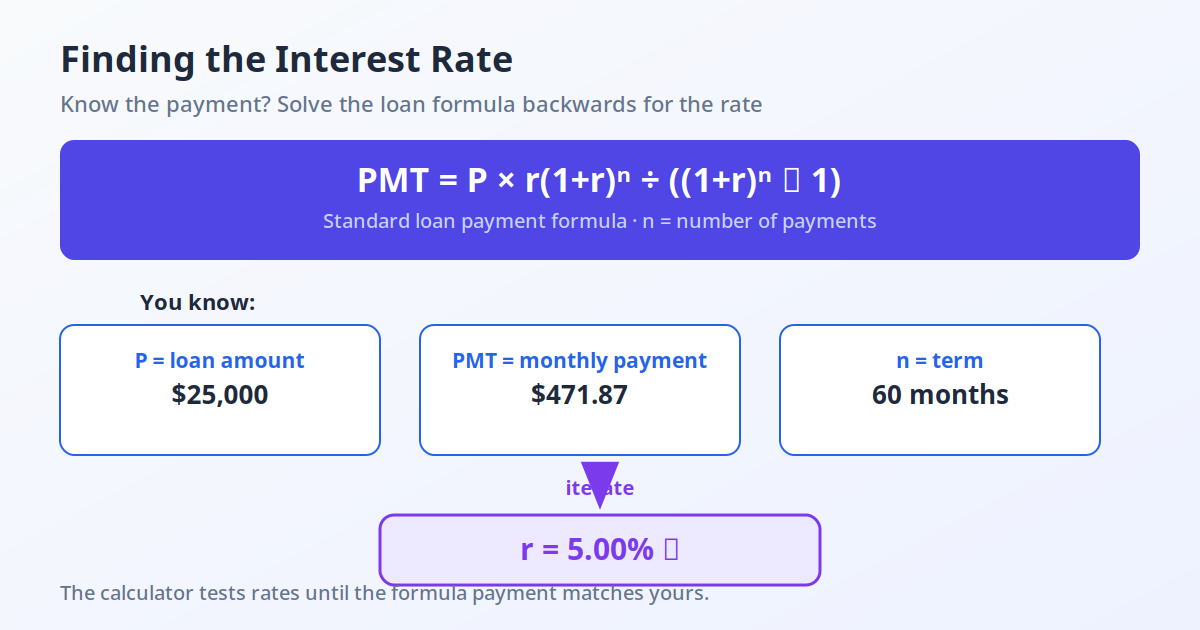
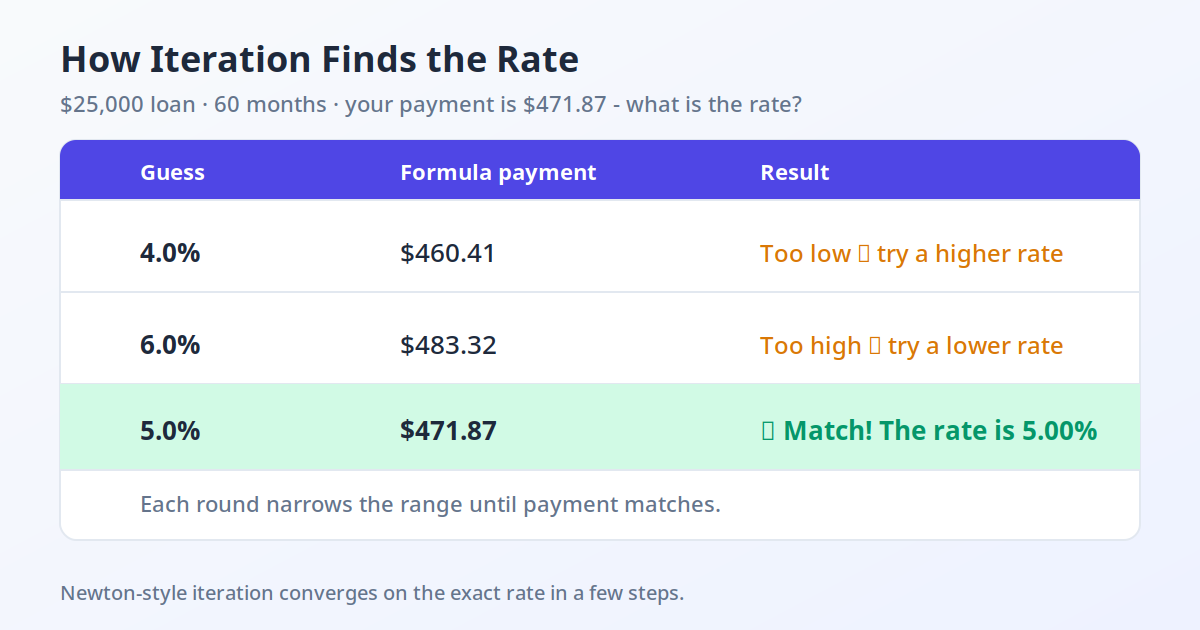
A fixed-rate loan’s payment is set by the amortization formula: PMT = P x r(1+r)^n / ((1+r)^n – 1), where P is the principal, r the periodic rate, and n the number of payments. When the payment is known and the rate is not, the equation must be solved backwards for r. Because r appears both inside and outside the exponent, no rearrangement isolates it, so the interest rate calculator uses Newton-Raphson iteration: starting from a guess and refining it until both sides agree to high precision, usually within a handful of cycles.
The annualized result is the nominal rate compounded at the payment frequency: the periodic rate multiplied by the number of periods per year. Note this is the nominal rate, not the APR, since upfront fees are not part of this calculation. If fees were rolled into the loan, the implied rate on the gross amount reads slightly lower than the true APR on net cash received, which is why a companion APR calculation is useful for fee-inclusive comparisons.
One subtlety: the iteration can fail on degenerate inputs, such as a payment too small to ever cover the interest (negative amortization). The calculator guards against these cases and reports an error instead of a nonsense rate, which is itself useful diagnostics: if no positive rate satisfies your numbers, the quoted schedule cannot amortize the principal.
How the Iteration Works
Newton-Raphson iteration refines a rate guess using the function’s slope: each cycle computes how far the guessed payment is from the actual payment and corrects proportionally. For well-behaved loan inputs it converges in under ten iterations to better than a millionth of a percent. The method needs a sane starting guess, typically derived from a simple-interest approximation, and it can only find the economically meaningful positive root, which is exactly the rate a borrower cares about.
The Formula
PMT = P x [r(1+r)^n] / [(1+r)^n – 1]; solve for r by iteration, then Annual Rate = r x periods per year x 100.
Variables Explained
- P (principal): the amount borrowed.
- PMT (payment): the fixed amount paid each period.
- n: the total number of payments.
- r: the interest rate per period, the unknown being solved for.
Limitations
This solves for a single fixed rate over the whole term. It cannot model adjustable-rate loans, graduated payments, balloon payments, or skipped-payment schedules, each of which needs its own amortization structure. It also assumes payments occur at regular intervals starting one period after funding; real loans with odd first periods differ by a few dollars.
Worked Example: The Dealer’s “$389 a Month” Offer
You borrow $24,000 for 72 months at $389 per month. What rate is the dealer charging? Feeding P = 24,000, PMT = 389, and n = 72 into the amortization equation and iterating gives r of about 0.00654 per month, an annual nominal rate of roughly 7.85%.
| Input | Value |
|---|---|
| Loan amount | $24,000 |
| Monthly payment | $389 |
| Term | 72 months |
| Implied annual rate | about 7.85% |
| Total paid | $28,008 |
| Total interest | $4,008 |
If the dealer advertised “just 6.9%,” the payment math says otherwise: either fees were rolled in or the quote was optimistic. That 0.95-point gap is worth about $700 over the life of the loan, and it is exactly what this reverse calculation is for.
A Quick Approximation Before You Calculate
If you want a mental sanity check before using the calculator, this classic approximation estimates the annual rate from the totals alone:
Approximate rate ≈ (2 × payments-per-year × total interest) ÷ (loan amount × (number of payments + 1))
Example: a $20,000 loan repaid at $400 per month for 60 months costs $400 × 60 − $20,000 = $4,000 in total interest. The estimate is (2 × 12 × 4,000) ÷ (20,000 × 61) = 96,000 ÷ 1,220,000 ≈ 7.87%. The exact rate from the payment formula is 7.42%. The shortcut assumes the balance falls in a straight line, which makes it run slightly high on most loans — close enough to spot a bad deal, but use the calculator (or the amortization check) for the number you would actually sign against.
Practical Tips for Reverse-Engineering Rates
Start by checking the lender’s own disclosure: in many jurisdictions the stated finance charge and payment schedule must reconcile, and a quick run through this interest rate calculator tells you whether they do. When auditing a “0% for 12 months then 24.99%” credit offer, split the schedule into two phases and solve each separately rather than forcing one rate onto the whole term. For seller-financed real estate, back out the implied rate and compare it with current mortgage rates; sellers often embed above-market yields in seemingly friendly payment plans.
Remember that fees change the answer’s meaning. If $1,000 of closing costs were rolled into the $24,000 principal, the implied rate on the gross figure understates your true cost; rerun the calculation on $23,000 net advanced to see the fee-loaded rate. And when comparing a biweekly payment plan against a monthly one, keep the frequency setting honest: 26 half-payments a year is not the same as 12 full ones, and the implied annual rate will reveal the difference.
Second Scenario: Auditing a Personal Loan Disclosure
A lender offers you $15,000 at $332 per month for 60 months and quotes 11.5%. Running the numbers: P = 15,000, PMT = 332, n = 60. The iteration converges on a periodic rate near 0.00996, or about 11.95% annualized, four-tenths above the quote. The discrepancy usually traces to an origination fee rolled into the principal. If a $400 fee was added, the true amount advanced was $14,600, and solving against that principal pushes the implied rate to roughly 12.6%. Either way, the calculator turns a vague suspicion into a concrete number you can put to the loan officer.
Frequently Asked Questions
How is this different from an APR calculator?
An APR calculator starts from a quoted rate plus fees and computes the all-in annualized cost. An interest rate calculator starts from the payment schedule alone and backs out the implied nominal rate, ignoring fees. Use this one to audit a quoted rate; use the APR tool to compare total loan costs.
Can it handle weekly or biweekly payments?
Yes. The underlying equation only cares about the periodic rate and the count of periods. Enter the payment per period and the total number of periods, select the matching frequency, and the calculator annualizes correctly. A biweekly schedule, for instance, annualizes over 26 periods.
What if my loan has a balloon payment?
The standard solver assumes the final payment equals all the others. A balloon, a large final payment, needs a modified equation; forcing it through this calculator will understate the true rate. A dedicated balloon-loan calculation is more accurate for that structure.
Why does the calculator say there is no solution?
When the payment does not even cover one period’s interest on the principal, no positive interest rate can amortize the loan: the balance would grow forever. This usually means a data-entry error in the term or payment, but it can also expose a genuinely impossible quote.
Does it work for 0% interest offers?
Perfectly, and informatively. Enter the price, the monthly payment, and the term; if the implied rate comes back above zero, the 0% was subsidized by a higher purchase price or hidden fees. The math does not care about marketing.
Will the result match my amortization schedule?
It should match to within rounding, provided the schedule uses a fixed rate and level payments. Small differences of a few basis points usually come from day-count conventions or an odd first payment period in the lender’s system. Persistent mismatches beyond a tenth of a point deserve an itemized fee breakdown before you sign.
Can I use it to compare refinancing offers?
Yes, with a caveat: adjust the principal for any cash-out or rolled-in closing costs before comparing implied rates. Better yet, run each offer through an APR calculation so fees are reflected, then use this tool as a cross-check that the payment schedule matches the disclosure.
What is the difference between nominal rate and effective annual rate?
The nominal rate is the stated annual rate divided into periodic chunks; the effective annual rate (EAR) accounts for compounding within the year. A 12% nominal rate compounded monthly is actually about 12.68% effective, because each month’s interest earns interest. This calculator reports the nominal rate, which is what lenders quote; multiply through (1 + r)^periods – 1 if you need the EAR.
How do I find the interest rate on a loan from my monthly payment?
If you know the loan amount, the monthly payment, and the number of payments, you can calculate the interest rate from the payment by solving the standard amortization formula for the rate. Since there is no simple algebraic rearrangement, the rate is found by iteration — trying rates until the payment matches. Enter your numbers in the calculator above and it solves this for you in seconds.
What is the loan interest rate formula?
The loan interest rate formula comes from the payment equation: Payment = P × r(1+r)^n / ((1+r)^n − 1), where P is the principal, r is the monthly rate, and n is the number of payments. To find the rate itself, you work backwards from a known payment, which requires numerical solving. This is exactly what an interest rate calculator does automatically.
What is the difference between nominal and effective interest rate?
The nominal vs effective interest rate distinction matters because nominal rate is the stated annual rate before compounding, while the effective rate reflects how often interest compounds within the year. A 6% nominal rate compounded monthly equals about 6.17% effective. Always compare effective rates when lenders compound on different schedules.
How do I find the interest rate in Excel or Google Sheets?
Use the RATE function: =RATE(number of payments, -monthly payment, loan amount), then multiply by the payments per year. For a $20,000 loan at $400/month over 60 payments, =RATE(60, -400, 20000) returns about 0.618% per month, and × 12 gives the 7.42% annual rate. The payment must be negative because it is money leaving your account. This calculator performs the same iterative calculation without the spreadsheet.
Related Calculators
Try our Mortgage Calculator, Loan Calculator, and Compound Interest Calculator.
Related: APR Calculator, Estate Tax Calculator.