Hexadecimal arithmetic — add, subtract, multiply, divide hex numbers.

What Is a Hex Calculator?
A hex calculator performs arithmetic — addition, subtraction, multiplication, and division — on hexadecimal numbers, the base-16 system that programmers, engineers, and computer scientists use every day. Hexadecimal digits run 0–9 followed by A–F, where A equals 10, B equals 11, C equals 12, D equals 13, E equals 14, and F equals 15. Because each hex digit maps exactly to four binary bits, hex is the compact, human-readable shorthand for the binary values computers actually process.
You meet hexadecimal constantly even if you never write code: color codes like #FF5733 in web design are hex triplets, memory addresses in error messages appear in hex, network subnet masks are often written that way, and Unicode characters are identified by hex code points. Doing math in base 16 by hand is error-prone — carries work differently than in decimal — so this tool handles the arithmetic and shows each result in hex, decimal, and binary side by side.
This tool is built for students learning number systems, developers debugging low-level code, electronics hobbyists working with microcontrollers, and anyone preparing for a computer science exam. Enter one or two hex values, pick an operation, and get an instant verified answer with the decimal and binary equivalents shown alongside.
How to Use This Calculator
- Enter the first hex number. Type digits 0–9 and letters A–F in upper or lower case — 1A3F and 1a3f are the same value. A leading 0x prefix (as in 0x1A3F) is accepted but not required. Only valid hex digits are allowed; G through Z will be rejected.
- Choose an operation. Pick addition, subtraction, multiplication, or division — or convert a single value between bases with no operation at all. Division returns both the quotient and the remainder in hex.
- Enter the second hex number for two-operand operations, using the same digit rules. If a subtraction would go negative, the tool shows the signed result together with its two’s complement form.
- Read the hex result. The answer appears in hexadecimal first, since that is the working base. Sanity-check the digit count: adding two 2-digit hex numbers can produce a 3-digit result when there is a final carry.
- Check the decimal and binary equivalents. Every result is shown in all three bases. The decimal value confirms the magnitude in familiar terms, and the binary reveals the exact bit pattern — useful when masking bits or setting flags in code.
- Study the conversion steps to learn. Each result includes the place-value math, for example 0x2F = 2×16 + 15 = 47 in decimal. Working through these by hand a few times builds the intuition to estimate hex values mentally.
How Hexadecimal Arithmetic Works
Hexadecimal is base 16: each digit position represents a power of 16 rather than a power of 10. The rightmost digit is the 16^0 (ones) place, then 16^1 (sixteens), 16^2 (two-hundred-fifty-sixes), and so on, with digits 0–9 for zero through nine and A=10 through F=15. So 0x2F means 2 sixteens plus 15 ones: 2×16 + 15 = 47 in decimal.
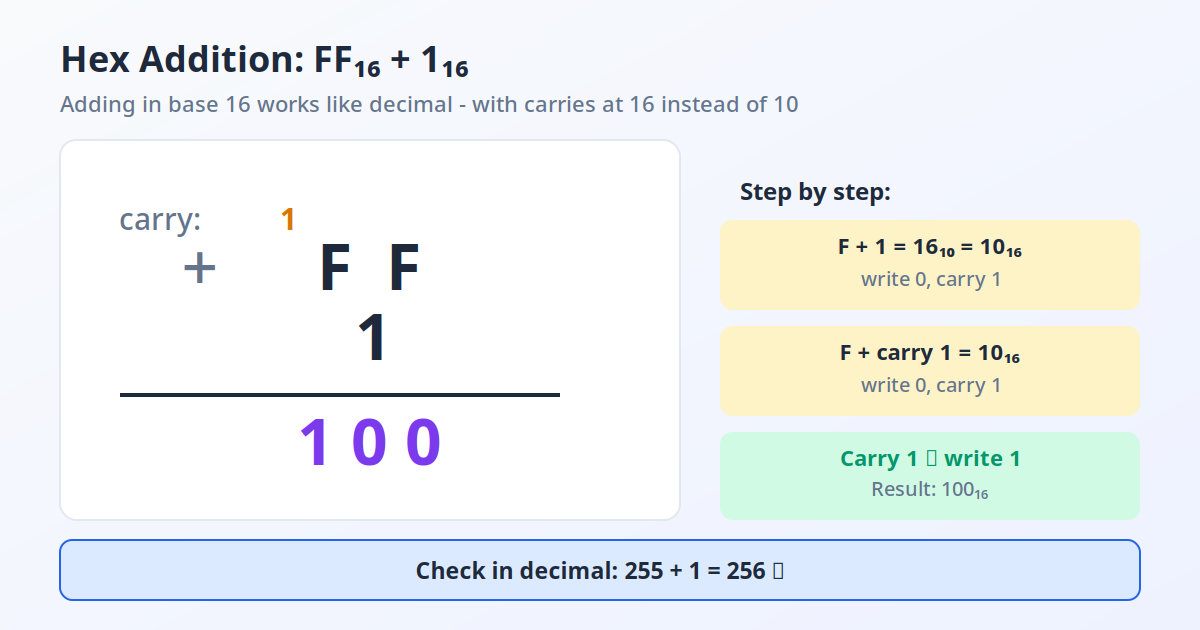
Addition and subtraction work like decimal column arithmetic, except you carry or borrow at 16 instead of 10. Take 1A + 2F: in the rightmost column, A (10) + F (15) = 25 decimal, which is 16 + 9, so you write 9 and carry 1. Then 1 + 2 + the carried 1 = 4, giving 0x49. Verify in decimal: 26 + 47 = 73, and 4×16 + 9 = 73. The tool applies this carry logic to every column automatically.
Multiplication and division run through an internal conversion: each operand becomes its decimal value, the operation is performed, and the result is converted back to hex. Division reports the remainder in hex as well, since integer division is the norm in programming. Bit-level work like AND, OR, and shifts is easiest to verify in the binary view shown beside every result.
Two’s Complement and Negative Numbers
Computers store negative integers in two’s complement: invert every bit and add one. In an 8-bit system, −1 becomes 0xFF and −26 becomes 0xE6. When a subtraction here yields a negative result, the tool shows both the signed decimal value and the two’s complement hex form at 8, 16, and 32 bits, matching what a debugger or memory dump would display.
Why Base 16 Fits Computers So Well
Each hex digit is exactly four binary bits — one nibble. 0xF = 1111, 0xA = 1010, 0x5 = 0101, so 0xFF = 11111111 = 255 decimal. No other common base aligns this cleanly with binary, which is why programmers reach for hex when reading memory dumps, color values, or permission bitmasks: one digit per nibble, and the bit pattern is visible at a glance.
Limitations
This tool handles integers only — there are no hexadecimal fractions here, since real systems store fractional values as IEEE 754 binary floating point rather than hex fractions. Large values are fine, but results beyond 32 bits should be checked against your programming language’s own integer width, because overflow behavior differs between languages. Division is integer division with a remainder and never produces fractional hex.
Worked Example: Adding 0x1A3F and 0x2B7C
Suppose you are debugging firmware and need to add the memory offsets 0x1A3F and 0x2B7C, then express the sum in decimal and binary. Convert each operand first: 0x1A3F = 1×4096 + 10×256 + 3×16 + 15 = 4096 + 2560 + 48 + 15 = 6,719. And 0x2B7C = 2×4096 + 11×256 + 7×16 + 12 = 8192 + 2816 + 112 + 12 = 11,132.
Add the decimals: 6,719 + 11,132 = 17,851. Convert back to hex by repeated division by 16: 17,851 ÷ 16 = 1,115 remainder 11 (B); 1,115 ÷ 16 = 69 remainder 11 (B); 69 ÷ 16 = 4 remainder 5; 4 ÷ 16 = 0 remainder 4. Reading the remainders from bottom to top gives 0x45BB. Verify: 4×4096 + 5×256 + 11×16 + 11 = 16,384 + 1,280 + 176 + 11 = 17,851. Correct.
The binary form comes straight from the nibbles: 4 = 0100, 5 = 0101, B = 1011, B = 1011, so 0x45BB = 0100010110111011 — sixteen bits, exactly as a debugger would show the value. The table below summarizes the whole example the same way this hex calculator presents results.
| Value | Hexadecimal | Decimal | Binary |
|---|---|---|---|
| First operand | 0x1A3F | 6,719 | 0001101000111111 |
| Second operand | 0x2B7C | 11,132 | 0010101101111100 |
| Sum | 0x45BB | 17,851 | 0100010110111011 |
Where Hand Calculation Goes Wrong
You can convert through decimal by hand, as shown above — but column carries in base 16 are where manual work breaks down, especially under exam or debugging pressure. The classic mistake is carrying at 10 instead of 16, which turns 0x1A + 0x2F into 0x39 instead of the correct 0x49. Running the operation through the tool and comparing it with your hand result is the fastest way to catch that habit before it costs you.
Where You Meet Hex Every Day: Color Codes, MAC Addresses and Code Points
Hexadecimal arithmetic matters in code, but the notation itself is everywhere in everyday computing:
- Web color codes — a code like #FF5733 is three hex byte pairs: FF = 255 (red), 57 = 87 (green), 33 = 51 (blue). #FFFFFF is full-intensity white, #000000 is black, and halving each pair fades the color. Understanding hex turns a color picker from guesswork into arithmetic.
- MAC addresses — network hardware IDs such as 3C:22:FB:11:4A:9E are six hex byte pairs (48 bits) separated by colons.
- Memory addresses and error codes — debuggers and crash logs print addresses like 0x7FFF5FBFF8C0 because hex preserves the bit structure that decimal would hide.
- Unicode code points — written in hex with a U+ prefix, for example U+1F600 is the code point 128,512 written as hex digits.
Whenever you need to move between these and decimal, use the converter built into this calculator rather than converting by hand.
Frequently Asked Questions
What is hexadecimal, in simple terms?
Hexadecimal is a base-16 number system using the digits 0–9 plus the letters A–F for the values ten through fifteen. It exists because one hex digit maps exactly to four binary bits, making it a compact way to write the long strings of ones and zeros computers use. Programmers use it for memory addresses, color codes, and anywhere bit patterns matter.
How do I convert hex to decimal by hand?
Multiply each digit by 16 raised to its position, counting from zero at the right, then add the results. For 0x2F: F sits in position 0 (15×1 = 15) and 2 sits in position 1 (2×16 = 32), so the total is 47. Work right to left and remember A=10 through F=15.
How do I convert decimal to hex?
Divide the decimal number by 16 repeatedly, writing down each remainder, until the quotient reaches zero. Then read the remainders from bottom to top, replacing 10–15 with A–F. For 255: 255÷16 = 15 remainder 15 (F), then 15÷16 = 0 remainder 15 (F), giving 0xFF.
What is 0xFF in decimal and binary?
0xFF equals 255 in decimal: F×16 + F = 15×16 + 15 = 240 + 15. In binary it is 11111111 — eight ones — because each F is the nibble 1111. It is the largest value a single byte can hold, which is why you see it constantly in color codes (#FFFFFF is white) and subnet masks.
Why do programmers use hex instead of decimal?
Because hex mirrors how hardware stores data: one digit per four-bit nibble, so bit patterns stay visible. Reading 0xFF00 immediately tells a programmer the top byte is all ones and the bottom byte all zeros; the decimal 65280 hides that structure completely. Error messages, debuggers, and memory dumps all speak hex for this reason.
What is two’s complement in hexadecimal?
Two’s complement is how computers store negative integers: invert all the bits and add one. In 8-bit hex, −1 is 0xFF, −2 is 0xFE, and −128 is 0x80. When this tool’s subtraction gives a negative answer, it also shows the two’s complement form so the result matches what you would see in a debugger.
Can this tool handle fractions or very large numbers?
This tool works with integers only — hexadecimal fractions exist in theory but are never used in practice, since real systems store fractional values as IEEE 754 binary floating point. Large integers are fine, but if a result exceeds 32 bits, verify it against your language’s integer width, because overflow behavior differs between languages and the tool does not emulate any specific one.
How do I convert hex to decimal?
Multiply each hex digit by 16 raised to its position power, counting from zero on the right. For example, 0x1A3 = 1×256 + 10×16 + 3 = 419 in decimal. The hex calculator above shows the full breakdown for any value, or use the hex to decimal converter mode for quick results.
How does hex addition work?
Hex addition works like decimal addition, except you carry when a column reaches 16 instead of 10. For example, 0xA + 0x7 = 0x11 because 10 + 7 = 17, which is 1 sixteen and 1 one. Try the hex addition calculator above to see each carry step worked out.
What is the relationship between hex and binary?
Each hex digit maps exactly to 4 binary digits, which makes conversion easy. 0xF = 1111, 0xA = 1010, and 0x3C = 0011 1100. This nibble mapping is why hexadecimal is the standard shorthand for binary in computing, from memory addresses to color codes.
How do hex color codes work?
A web color code is three hexadecimal byte pairs: #RRGGBB, where RR is the red channel, GG the green channel and BB the blue channel. Each pair ranges from 00 to FF (0 to 255). In #FF5733, FF means 255 red, 57 means 87 green, and 33 means 51 blue. #FFFFFF is white, #000000 is black, and #808080 is a mid gray (128 of each channel).
What is a nibble in hexadecimal?
A nibble is 4 bits — exactly one hexadecimal digit, with 16 possible values from 0 to F. A byte is two nibbles (8 bits), which is why one byte is always exactly two hex digits, 00 to FF. Thinking in nibbles is the key to reading binary data in hex: the hex digit A is nibble 1010, and two of them, AA, are the byte 10101010.
Related Calculators
Try our Percentage Calculator, Fraction Calculator, and Scientific Calculator.
Related: Exponent Calculator, Molarity Calculator.