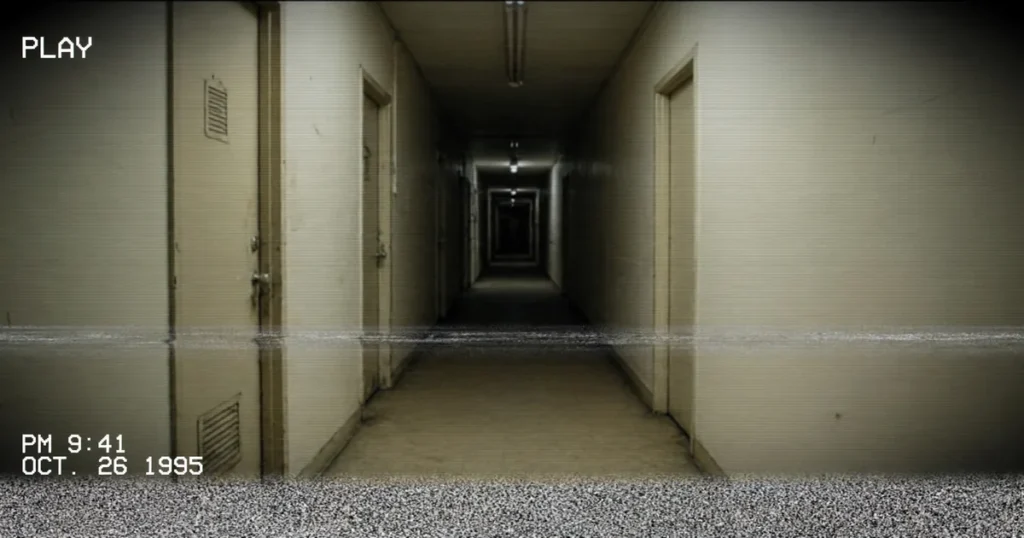
Turn any photo into a frame pulled from a worn videotape. This analog horror image generator rebuilds the look of a 1990s camcorder recording: tracking lines crawling through the picture, head-switching noise chewing at the bottom edge, interlace lines, tape grain, a soft vignette, and the glowing PLAY marker and date stamp burned into the corner. Everything runs in your browser on your own device. Nothing is uploaded, there is no sign-up and no watermark.
Or drag and drop a photo onto this panel. JPG, PNG and WebP all work. Dim, ordinary, everyday photos usually make the most convincing analog horror stills.
Presets
No image chosen yet. Pick a photo and it will appear here as a paused tape frame.
Processing is local and the preview updates as you move the sliders. Very large photos are scaled to a 2400 pixel longest side so phones stay responsive; the downloaded PNG matches the preview.
What is analog horror?
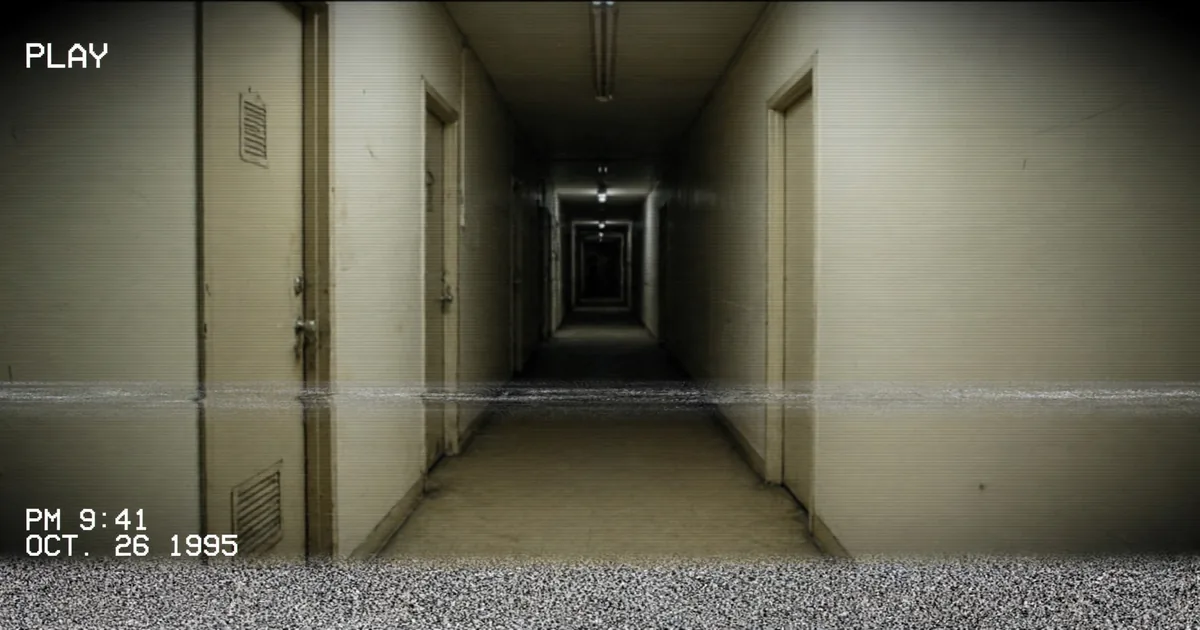
Analog horror is a style of horror storytelling built around old recording technology. Instead of a polished cinema camera, the story pretends to reach you through a scratched videotape, a cheap camcorder, a local television broadcast or a training video that was never meant to be watched by the public. The format is the monster’s accomplice: because the picture is degraded, your imagination has to fill in the gaps, and what it fills in is usually worse than anything a clear image could show. An empty hallway is just an empty hallway in high definition. The same hallway, recorded on a dying tape at 2 in the morning with the date stamp glowing in the corner, feels like evidence.
The genre grew out of web series and shorts imitating local TV broadcasts, emergency alerts, instructional tapes and found home movies. Its tricks are consistent: familiar, everyday footage; something slightly wrong that the camera never explains; and a recording that degrades or ends at exactly the wrong moment. The visual language matters as much as the plot. If the frame looks like it was shot yesterday on a phone, the illusion collapses. If it looks like it was recorded in 1994 and left in a damp box since, the illusion holds.
That is the gap this tool fills: no real camcorder, capture card or stack of blank tapes required, just a still photo and a convincing layer of tape behavior on top of it.
What the VHS look is actually made of
A real tape recording is not one effect. It is a stack of small failures, each with a physical cause, and a believable result needs most of them present at believable strengths.
Tracking lines and head-switching noise. A VCR reads the tape with a spinning head drum. When the tape path drifts, a band of noise rolls through the picture: the tracking error. At the very bottom of the frame sits a permanent strip of jitter where the heads switch over, which is why the bottom edge of old recordings shimmers and tears. This tool draws both: a displaced noise band somewhere in the frame, and a noisy, shifting strip along the bottom rows.
Interlace lines. Analog television drew each frame in two passes, odd lines then even lines. Freeze a frame and the two passes can disagree, leaving fine horizontal striping, strongest on anything that moved. The interlace slider darkens alternate lines to imitate that structure.
Tape noise and grain. Magnetic tape hisses visually. Dark scenes especially fill with restless speckles because the signal was weak and the tape medium itself was noisy. The noise here is seeded: the same settings on the same photo produce the same pattern every time, and Re-roll deals you a fresh one.
Chromatic aberration, the analog way. On tape, color information was stored with far less detail than brightness, so strong edges smear and colors drift sideways off their subjects. This is a soft horizontal color shift, nothing like the hard red, green and blue channel splits of a digital glitch. The slider keeps it subtle for that reason: one or two pixels sells it, five turns it into a different genre.
Vignette and faded color. Cheap camcorder lenses darken the corners, and tape color fades toward grey with every copy. Presets desaturate slightly and the vignette slider darkens the edges, so the frame feels lit by a weak television in a dark room.
The timestamp overlay. Camcorders burned their clock straight into the recording: PLAY in the top corner, and a blocky date and time, usually bottom left, in a glowing monospace font. It is pure context, not signal, but nothing dates a frame faster. Here the stamp is an editable text field, so the date can say anything your story needs.
How to use the analog horror image generator
- Choose a photo. Click the file picker or drag a photo onto the panel. Ordinary snapshots work best: a corridor, a garden at dusk, an empty room, a family photo where everyone is slightly too far from the camera.
- Pick a preset. Start with 1990s Camcorder for a believable home movie frame, Found Footage for a damaged tape, or Late Night Broadcast for a recorded-off-television feel.
- Fine-tune with the sliders. Raise tape noise for dark scenes, tracking damage when you want the tape to feel mistreated, and keep chromatic aberration low. Every change redraws the preview instantly.
- Set your stamp. Edit the stamp text so the date matches your story, or untick the boxes to remove the PLAY marker and stamp entirely.
- Re-roll if it feels wrong. Real tape damage is random. The Re-roll button generates a new damage pattern with the same settings.
- Download the PNG. The saved file matches the preview exactly, at full processed resolution.
Preset guide: which look for which job
| Preset | Character | Reach for it when |
|---|---|---|
| 1990s Camcorder | Light noise, mild tracking, gentle vignette, faint interlace. The tape is old but loved. | Birthday-party stills, family photos, anything that should feel nostalgic first and unsettling second. The default, and the safest choice for faces. |
| Found Footage | Heavy noise, strong tracking band, chewed-up bottom edge, darker vignette, more faded color. | The tape was found, not kept. Trail cameras, basements, hospitals, forests at night: scenes where the recording itself should feel like it barely survived. |
| Late Night Broadcast | Strong interlace, medium noise and tracking, a slight vertical roll as if the picture is about to lose lock. | Frames that pretend to be recorded off a television: station idents, weather maps, local news stills, and anything with an on-screen graphic. |
The presets are starting points, not rules. A common move is to load Found Footage, then drag tape noise down until the subject’s face is readable again: horror lives in the space between visible and almost visible.
Worked example: a hallway becomes evidence
Take a completely ordinary photo: a phone snapshot of a hotel hallway, bright carpet, doors on both sides, a fire exit sign glowing at the far end. As a modern photo it says nothing. Here is the conversion, using the Found Footage preset with two small adjustments.
The preset loads with tape noise at 55, tracking at 65, vignette at 55, chromatic aberration at 2, interlace at 50 and a faded, desaturated grade. The hallway lights bloom slightly, the carpet pattern dissolves into grain, and a noise band sits across the middle distance where the doors repeat. Then the adjustments: the stamp text is changed to a date that fits the fiction, say the night the hotel closed, and tape noise is eased down to 45 so the exit sign stays legible, because a readable sign in an unreadable corridor is the scariest combination in the frame. The PLAY marker stays on. The result no longer looks like a photo of a hallway. It looks like the last frame before the tape was stopped, and the viewer immediately starts asking who was holding the camera. Nothing in the scene changed. Only the recording did.
Creative uses for analog horror stills
Indie horror projects. Game developers, short-film makers and web-series creators use tape stills for evidence boards, in-universe documents, loading screens and teaser posters. A set of stills with matching stamps reads as one recovered archive.
Thumbnails and cover art. On video platforms the camcorder frame is instantly readable: viewers recognize the PLAY marker and date stamp at thumbnail size, and the degraded image stands out against clean, bright competitors. The same logic works for podcast covers and serialized fiction.
Storytelling and worldbuilding. Writers and role-playing groups use stills as props: the photograph in the case file, the last image from the missing hiker’s camera, the frame the archivist cannot explain. Because the stamp is editable, each still carries its own date and slots into a timeline. For a different paper-prop feel, run a finished still through the image to stencil converter and print it as a stark black-and-white photocopy.
Social posts and edits. A mundane photo with a tape treatment becomes a small piece of fiction. Birthday photos from the year you were born, your street at night, your own childhood home: the format supplies the dread for free.
Analog, glitch or deep-fried? Picking the right damage
These three looks are cousins, and the difference is the story each one tells. This tool is analog: the picture pretends to be a tape recording, so the damage is soft, horizontal and physical: tracking bands, head-switching noise, interlace, grain and a burned-in clock. Choose the glitch image generator instead when the fiction is a broken digital file: hard RGB channel splits, sliced blocks and data corruption say computer error, not old tape. Choose the deep-fried image generator when the joke is a meme that has been re-saved a thousand times: crushed saturation and sharpening artifacts are comedy damage, not horror damage. Mixing them usually weakens all three; a frame that commits to one fiction is the one people believe.
Limitations to know about
This is a stylistic filter, not a time machine. It imitates the surface behavior of tape on a still image, and a few honest limits follow. The effect works on photographs; it cannot invent footage, so a frame with nothing unsettling in it will come out as a merely old-looking photo of nothing unsettling. Bright, clean studio portraits fight the treatment, because real camcorders were worst exactly where studio lighting is best. Very large images are scaled to a 2400 pixel longest side before processing so phones do not stall, which is plenty for posts and thumbnails but not for print posters. And the damage is a still: real tapes move, roll and tear over time, while a still can only imply that motion. Treat the output as a frame from a story, not as the story itself.
Frequently asked questions
What is an analog horror image generator?
It applies the visual behavior of old analog recordings (VHS tapes and camcorders) to a normal photo: tracking lines, head-switching noise at the bottom of the frame, interlace lines, tape grain, faded color, a vignette, and the PLAY marker and date stamp camcorders burned into recordings. The result: a still that reads as a frame from a found tape, the core aesthetic of analog horror.
How is this different from a glitch effect?
Glitch effects imitate digital failure: hard red, green and blue channel splits, sliced blocks and corrupted data. Analog horror imitates tape failure, which is softer and mostly horizontal: mistracking bands, jitter where the VCR heads switch, interlaced lines and restless grain. The color shift here is a gentle analog smear of one or two pixels, not a digital channel split.
Can I change the date on the timestamp?
Yes. The stamp is a plain text field: type any date and time in the camcorder style, for example an evening in 1987 or the night your story is set, and the overlay updates as you type. You can also switch the stamp and the PLAY marker off independently if you want clean tape damage with no overlay.
Are my photos uploaded to a server?
No. The generator runs entirely in your browser using your own device. Your image is read locally, processed locally and downloaded from the page itself. Nothing is sent anywhere, stored anywhere or watermarked, which also means it works on private photos you would never hand to an upload service.
Which photos work best with the VHS effect?
Dim, ordinary photos with a clear subject: hallways, empty rooms, gardens at dusk, parking areas, stairwells, old buildings, roads at night. Strong light sources and signs read beautifully through grain. Very bright, sharp studio shots can still work, but start with the gentler 1990s Camcorder preset so faces stay readable.
What format does the finished image download in?
PNG. The download matches the preview exactly, including the tracking damage, overlays and stamp, at the processed resolution (up to a 2400 pixel longest side). PNG keeps the noise and fine lines crisp, where a JPEG re-save would smear them with compression artifacts of the wrong, digital kind.